June
Changelog

Product Updates

Weekly product updates from the team building June.

RSS feed

Expanded MDM Actions, Chat Polish & Request Detail Redesign

This week brings a much wider set of MDM remote actions across Jamf, Kandji, and Entra, a top-to-bottom chat experience refresh with a dedicated expanded mode, and a cleaner request execution page. Every Slack notification June sends now routes through a hardened formatter so bold, links, and lists render correctly inside Slack.

Product Improvements
  • Expanded MDM Remote Actions: Restart, shutdown, lock, force check-in, and enable/disable remote desktop are now available across Jamf, Kandji, and Entra-managed devices, all gated behind manual approval.
  • Chat Expanded Mode: The chat panel now has a docked and expanded toggle with a smooth motion between modes, ESC and route-change auto-collapse, and your preference persisted across sessions. Expanded mode adds a left sidebar with new chat plus recents, a per-row actions menu, and a centered reading-column layout.
  • Chat Tool Cards & Streaming Polish: Tool cards are now compact one-line timeline rows with provider icons, a live shimmer while in flight, and auto-collapse into a “Used N tools” group when settled. The composer disables and Stop moves inline while streaming or awaiting human approval, and the bot icon shows a thinking state.
  • Request Detail Redesign: The request execution page is now a continuous timeline with collapsible step rows on a single hairline, hover-only timestamps, a streaming sweep on the live step, and auto-follow with a Jump-to-live affordance. Distinct visual states for planning, triage, awaiting approval, replanning, and cancelled, plus a completion summary banner once the run finishes.
  • Request Detail Sidebar: A new right rail mirrors the Automations layout with the approver, source, restart action, and an autonomous-approval badge surfaced prominently when the run was approved without a human.
  • Contract Form Overhaul: The contract editor now uses a two-column layout with a Summary and Documents sidebar, a header dropdown for re-sync from provider, re-extract from documents, ignore, restore, and delete, and metric tooltips that explain monthly, annual, and per-license values.
  • Contract Extraction History: Each contract now shows a per-integration history of document extractions with the documents processed, extracted fields with confidence scores, and any errors. Contract pages also live-update when a re-sync or re-extract finishes in the background.
  • Slack Formatting Overhaul: Every Slack notification, from sync summaries to June Bot replies, now flows through a dedicated Markdown-to-Slack converter so bold, italic, links, code, tables, and lists render correctly inside Slack instead of leaking raw Markdown.
  • Software Policy Platform Filter: Filter software policies by installation platform (mac, windows, ios, etc.) on both the policies list and the software applications page, with subscription-only policies excluded automatically.
  • Faster, More Reliable Entra Sync: Entra syncs are now faster and more resilient when Microsoft applies rate limits, with smarter back-off and fewer redundant calls across jobs.
  • Scoped Jira Webhooks: Jira webhooks now only process events from the integration’s configured default project, so unrelated project activity no longer creates noise in June.
Bug Fixes
  • Jamf Action Failures Surface Correctly: Restart and force check-in now return a clear failure when the device responds with a 404, instead of falsely reporting success. Jamf Classic command bodies are now sent in a format the device list reaches.
  • Slack Link & URL Handling: Link labels now escape pipes, angle brackets, and ampersands; URLs containing balanced parentheses and pre-formed Slack tokens are preserved verbatim through the formatter; and empty link labels emit a bare URL instead of a stray pipe.
  • Slack Bold vs Italic: Double underscores now map to Slack bold rather than italic, and emphasis no longer crosses blank-line boundaries.
  • Kandji Action Failures: 404 responses from Kandji action endpoints are now treated as failures and surfaced as such, instead of being swallowed as successes.
Browser Extension

The June Browser Extension is now generally available. Capture how your team actually uses SaaS in the browser, deploy it the way that fits your environment, and turn raw browsing data into shadow-IT discovery and seat-level utilization.

What you can do:

  • Deploy with a Guided Wizard — Pick a strategy and walk through the setup step by step, with a Jamf path that pushes the configuration profile via the Jamf Pro API and a Google Admin path that covers managed Chrome profiles for BYOD.
  • Choose a Deployment Strategy — MDM Only for fully managed fleets, MDM Agent + Chrome for mixed environments, or Google Admin when you only manage browser profiles.
  • Control Work Profiles — Toggle work-profiles-only mode so the extension reports activity from corporate browser profiles and ignores personal browsing on shared devices.
  • Configure Tracked Applications — Pick which apps June should track, customize the domains per app, exclude defaults you do not want counted, and add custom domains for self-hosted tools.
  • Track Daily Usage in the Browser — The extension records active time per tracked app and emits usage on a rolling cadence, feeding daily usage history and average-daily-usage pills on every application policy.
  • Discover Shadow IT and Right-Size Seats — Browser activity resolves to software subscriptions and rolls up into utilization, surfacing apps employees use that IT does not own and seats that sit idle.

Coupa, Contracts List Revamp & More Reliable Chat

This week brings the Coupa procurement integration, a structural overhaul of the contracts list, and chat that cancels cleanly across backend instances.

Product Improvements
  • Coupa Integration: Connect Coupa to sync requisitions into June, with commodity-based filtering you configure before the first sync, attachment ingestion, and AI extraction of contract fields like dates, payment frequency, auto-renewal, and notice periods directly into your software contracts.
  • Contracts List Revamp: The contracts page now uses lifecycle tabs (Active, Expired, Expiring Soon, Future) plus virtual tabs for Ignored and Needs Attention, with composable filters for app linking and review status, issue badges on each row, and a cleaner row layout.
  • Clickable Contract Metrics: Metric cards on the contracts page now include explainer tooltips, and clicking Total Spend, Active Contracts, or Expiring Soon jumps to the matching tab while Next Renewal links straight to the contract.
  • Reliable Chat Stop: Stopping a chat now reliably cancels what June is doing, even when the work is being handled by a different backend server. No more chats that keep generating after you’ve hit Stop.
  • Persisted Survey Responses in Chat: When a survey response comes back during a chat, the approval record is now stored on the execution so the response renders correctly when you reload the conversation.
  • Sharper Automation Tool Execution: Automations now run faster and more predictably — when a tool’s inputs are already known, June uses them directly instead of looking them up again.
  • Dynamic Integration Settings: Integration connection forms now support multi-select and provider-driven dynamic multi-select fields, so you can pick from values fetched live from the connected system.
Bug Fixes
  • Contract Breadcrumbs: Editing a contract from the policy Contracts tab now shows the full Software › App › Edit Contract chain instead of collapsing to a default.
  • Contract Validation Errors: Cross-field validation failures (such as end date before start date) now revert the write cleanly and surface a readable error rather than an internal one.
  • Active Contract Status: Contract status in the policy Contracts tab now only shows Active when the contract is truly within its active period, falling back to Unknown otherwise.

Surveys, Signals & Entity-Linked Automations

This week’s release lights up three new capabilities across June: structured employee feedback through Surveys, a proactive Signals feed that surfaces what needs your attention, and Automations that live alongside the specific entity they monitor.

Surveys

  • Template Editor With AI Assist — Build survey templates in a split-pane editor with drag-to-reorder fields, eight field types, inline editing, and a chat panel that drafts and updates the form for you.
  • Send Surveys To Employees — Send a survey to any employee from June or directly during a chat, with branded email delivery, variable substitution, and a tokenized public response page at /s/:token.
  • Structured Responses — A respondent table tracks who has and hasn’t replied, with filters and expandable rows showing each submitted response.
  • Inline Responses In Chat — Survey responses come back into the conversation that asked for them, rendered the same way as Slack interactive responses with the employee’s avatar and decision summary.

Signals

  • Findings Feed With Tabs And Filters — A new Signals page lists findings across Open, Acknowledged, Resolved, and Dismissed tabs, with search, category filters, and a needs-attention badge that pulses on the sidebar when action is required.
  • Detection Across Entities — Detectors run for assets, employees, software, and contracts, covering events like devices needing refresh, contracts approaching renewal, and cross-entity gaps such as missing devices or access mismatches.
  • Context Cards And Deadlines — Each finding shows a context card for the related employee, asset, contract, or software, with deadline labels colored by urgency and one-click links into the entity’s detail view.
  • Investigate In Chat — An Investigate button on any finding opens an AI chat seeded with the signal’s context, so you can dig in without rebuilding the situation by hand.

Entity-Linked Automations

  • Automations Tab On Software Policies — Software policy detail pages now have an Automations tab that lists every Automation scoped to that policy, with a count badge and grid of cards.
  • Scoped, Pre-Filled Creation — Launching an Automation from a policy skips the gallery and entity picker, pre-fills the form from the entity’s template defaults, locks scope-specific fields, and routes you back to the policy when you’re done.
  • Grouped By Related Entity — In the main Automations list, entity-linked Automations are grouped under their related entity type so you can see at a glance which policies (or other entities) have Automations attached.
Product Improvements
  • Weekly Digest Dashboard: The dashboard now opens with a weekly digest — a stats bar with employee, asset, and software counts and deltas, an Employee Updates card for people moving in and out, a Contracts card for renewals and changes, and a Needs Attention card pulling in the week’s new findings.
  • Organization Policies Settings: A new Settings page lets you enable or disable detection per event type and tune the thresholds (such as days-until-renewal or version-skew) that drive Signals, with debounced inline editing and reset-to-defaults per policy.
  • Real-Time Signals Updates: Signals stream in over the existing organization event subscription, so newly created findings and status changes appear in the list and detail view without a refresh.
  • Child Software Policies: Child policies now show a focused tab set (Overview, Subscriptions, Installations) with a parent-link banner in the header, and contract cards distinguish active versus expired with consistent styling alongside signal cards.
Bug Fixes
  • Auto-Resolve Cleanup: Resolved findings no longer carry stale related entities — the related-entity list is cleared on auto-resolve so closed signals don’t surface outdated context.
  • Pagination Recovery: The Signals list no longer gets stuck after a failed page load — retrying picks up where you left off.
  • Avatar Date Guard: Employee avatar tooltips no longer crash when hire or leave dates are missing or invalid.

Platform Maintenance

Behind-the-scenes maintenance this week to keep the platform fast and secure.

Product Improvements
  • Dependency Updates: Updated backend dependencies for improved security and performance.

Software Policy Hierarchy and Automations Plan Visibility

This week brings software policy hierarchy, sharper Automations plan previews, and more accurate device compliance data from Intune.

Product Improvements
  • Child Policy Support: Software policies now support parent-child relationships, with child policies showing a streamlined Overview, Subscriptions, and Installations view plus a parent link banner in the header.
  • Contract Ignore & Restore: Mark software contracts as ignored to keep them out of renewal counts and policy rollups, with a dedicated Ignored tab and one-click restore.
  • Active vs Expired Contract States: Contract cards now show clear active and expired states with status badges, and Plan Renewal actions are gated to active contracts only.
  • Software Dashboard Refinements: Upcoming Renewals now uses the budget and contract owner from policy roles, the All Applications view defaults to managed apps, and stakeholder names link directly to employee records.
  • Tool Parameters in Automations: Request execution plans display tool parameters as key-value pairs in tooltips, so you can see exactly what each step will run before approving.
  • Tool Subselection Flow: Redesigned the tool subselection dialog used in runbooks and Automations with searchable entity pickers and richer tool badges that show the targeted entity.
  • Streamlined Policy Access Tab: Removed the standalone Groups tab and inlined group membership directly into the Access tab, with provisioning details displayed alongside.
Bug Fixes
  • Intune Recovery Key Status: BitLocker recovery key escrow status is now read directly from Microsoft instead of being inferred, giving accurate compliance data for Windows devices.
  • Jira Webhook Conflicts: Fixed an error that could occur when multiple Jira webhooks fired at the same time for the same identity.
  • Chat Context Leak: Pending attachments now clear when switching conversations, so they no longer carry into unrelated threads.
  • Sign-In Edge Case: Resolved an authentication edge case during sign-in.

Automations

We’re excited to launch Automations, a new way to put your recurring IT workflows on autopilot. Automations run on a schedule, evaluate the assets, employees, software, and contracts in scope, and turn the results into actions June executes for you — with the same approval and notification controls you already use for chat.

What you can do:

  • Start From a Template Gallery — Browse a curated gallery of starter Automations across Assets, Employees, Software, and Contracts, or build one from scratch with a structured form.
  • Schedule in Plain English — Define cadence with natural language like “Every weekday at 9am” or “1st and 15th of every month” — no cron required.
  • Scope and Filter Precisely — Target the exact set of records each run should consider, with conditions and guidance that make it clear which records will match before you save.
  • Notify Over Slack and Email — Send results to the right channels, owners, or affected employees with multi-channel notification support.
  • Track Every Run — A dedicated runs view shows what each Automation evaluated, which records matched, and which actions were taken, with full execution flowcharts and revision history.
  • See Live Health on the Dashboard — Active Automations now surface on the main dashboard with run status, recent activity, and a one-click path to create your first one.
Product Improvements
  • Assets Dashboard Revamp: A new assets dashboard built on platform-aware stats — stacked discovery charts by platform, side-by-side department, location, and status distributions, percent-change trends on total assets and total cost, and a unified asset status badge across every table.
  • Employees Dashboard Revamp: Department and location distributions now use clean row-based progress lists, employee growth ships as a stacked bar chart with period selector, and a new status distribution chart breaks down employees, contractors, and other workers at a glance.
  • Standalone Groups Page: A new top-level Groups page with overview stats, member growth, and department breakdown, plus dedicated members and applications tabs and cross-entity links to employees, software policies, and departments.
  • Department Stats: Department detail pages now show employee, asset, and software metrics — headcount with monthly trends, attrition, hire date coverage, asset value and status breakdowns, software spend pro-rated across shared departments, and managed vs unmanaged coverage.
  • Avatar Status Dot: Employee avatars across the app now show a status indicator dot, so you can spot active, inactive, and on-leave employees at a glance from any list, table, or detail page.
  • Asset CSV Imports With Status: The asset CSV importer now accepts status as a column, and accepts both raw status keys and the display names you see in the UI.
  • Software Applications Export: Export the All Applications view to CSV with current filters and sort applied.
Bug Fixes
  • BitLocker Recovery Keys: Fixed BitLocker recovery key escrow on Entra so Windows devices report compliance from the Microsoft Graph recovery keys endpoint and always use the most recent key when multiple are present, with related fixes to Entra device ID resolution and tools routing.
  • Recurrence Filter: Fixed a bug in the recurrence filter that could surface incorrect results.
  • Asset Status Normalization: Asset status is now normalized at the model layer so imports, edits, and bulk updates land consistently regardless of casing or display vs raw values.
  • Filter Assets Without a Department: Asset list filters can now correctly target assets that have no department assigned.

Software Spend Visibility and Subscription Insights

This week sharpens how you see software usage and cost across your portfolio, with new export options, deeper subscription detail, and dashboard refinements.

Product Improvements
  • Software Application Export: Export the All Applications page to CSV with current filters and sort applied, including health status, roles, categories, contract details, and compliance data.
  • Server-Side Subscription Search and Sort: Subscription and installation tabs now run search and sort on the server, with a debounced query and sortable Department, Client Type, Last Active, and Employee Name columns.
  • Managed Apps Without Contract Card: A new dashboard card highlights managed applications that lack an active contract, alongside a 2-column layout refresh and consistent spacing across rows.
  • Asset Export Enrichment: Asset CSV exports now include MDM last check-in timestamps for better device tracking context.
  • Employee Status on Avatars: Employee status indicators now appear directly on avatars across asset, employee, and software pages for at-a-glance context.
  • June Bot Email Tool: The June Bot can now send branded internal emails as part of multi-step actions, with recipient validation and a styled template.
Bug Fixes
  • Site License Cost Allocation: Cost per assigned user is now calculated correctly for site license contracts by dividing contract value by subscription count instead of returning zero.
  • Site License Health Checks: Skipped seat-based under- and over-licensed health checks for site license contracts where they do not apply.
  • Zip Re-Sync Field Protection: User-edited contract type and manually entered license counts are now preserved when re-syncing data from Zip.
  • Provider Identity Sync: Resolved a unique constraint error that could occur when an employee’s email changed in the upstream identity provider.

Jira Ticket Sync & Software Contracts Polish

This week brings two-way Jira ticket sync into June, surfaces linked tickets on asset and employee pages, and rounds out the software contracts experience with a new Expiring Soon view and an admin product catalog.

Product Improvements
  • Jira Ticket Sync via Webhooks: Jira tickets from tracked projects now upsert into June automatically, with reporter and device links resolved on the fly so every ticket is connected to the right people and hardware.
  • Internal Context Comments on New Jira Tickets: When a new Jira ticket lands, June posts an internal comment with the reporter’s profile and assigned devices so IT teammates have the full picture before they start triaging.
  • Tickets Tab on Asset & Employee Pages: Asset and employee detail pages now include a Tickets tab that lists linked ITSM tickets with search, count badges, and lazy loading.
  • Expiring Soon Contracts Tab: The Software Contracts page picks up an Expiring Soon tab and full status counts on every tab badge to make renewal triage faster.
  • Needs Matching & Link-to-Application: A new Needs Matching tab groups unmapped contracts together, with a link-to-application popover for attaching them to the right software product in one click.
  • Compact Contract Form with Inline Document Preview: The contract form is tighter and faster to scan, and the documents list now previews PDFs and images inline instead of forcing a download.
  • Zip Sync Enrichment: Improved vendor and document matching during Zip syncs so contracts pull in cleaner product, vendor, department, and category data on first try.
Bug Fixes
  • Accurate Contract Length: Contract length now uses month-based math and correctly clears the end date for perpetual contracts.
  • Contract Form Stability: Resolved errors and stale data that could appear when editing contracts back-to-back.
  • Tickets Tab Resilience: Cached ticket data now persists across transient network errors instead of flashing an empty state.
  • License Count Handling: Explicit zero license counts are preserved on save and the field is properly optional throughout the contract form.

Zip Procurement Integration

We’re excited to launch our Zip integration, bringing your software procurement pipeline directly into June. Purchase agreements sync automatically, get matched to the right vendor and application, and turn into enriched contracts with order forms, owners, departments, and categories already filled in.

What you can do:

  • Sync Purchase Agreements — Pull every Zip agreement into June with contract value, term length, start and end dates, and renewal status.
  • Match Vendors To Applications — A five-tier matching pipeline reconciles Zip vendors and agreements to existing software products by exact name, normalized name, and tracked alternate names so you don’t end up with duplicate records.
  • Attach Order Forms Automatically — Order form PDFs and supporting documents come across with each agreement and preview inline on the contract page.
  • Enrich Contract Metadata — Departments, categories, vendor contact info, and contract owners are populated on the matching policy as agreements sync.
  • Reassign Unmatched Contracts — Use the new “Needs Matching” tab to map any contract Zip couldn’t auto-match to the correct application in a couple of clicks.
Product Improvements
  • Software Dashboard: New overview page with app discovery trends, top apps, ownership breakdowns, and upcoming renewals so you can see your portfolio at a glance.
  • Policy Grouping: Group related software policies into a parent application, with grouping suggestions surfaced automatically and rolled-up stats across the group.
  • Contracts Page Tile View: Toggle between the existing list and a new tile view with logos, status, validity, and renewal at-a-glance, plus dashboard-style metric cards at the top.
  • Software Product Enrichment: An LLM-backed enrichment job now fills in display name, category, compliance posture, and trust center URL for every software product, with structured per-framework compliance assessments.
  • Normalized Product Names: Sync now strips file extensions, bundle ID prefixes, and casing artifacts across all six device and identity integrations so the same app no longer shows up as several products.
  • Policy Detail Refresh: The Overview tab cleanly splits Security from Access, and provisioning details are now editable from a dedicated Access tab.
Bug Fixes
  • Contract Filtering: Fixed contract and subscription filtering so results stay accurate when filters are stacked.
  • Grouped Sort & Stats: Fixed grouped counts in sorting, stats ranking, and grouping suggestions so totals match what’s on screen.
  • Software Tile UX: Consolidated active and inactive badges into a single utilization badge and fixed a duplicate-key crash when scrolling long lists.
  • Empty License Counts: Empty license count fields now render correctly across contract tiles, the contracts table, and the policy contracts tab instead of triggering errors.

Chat Attachments

We’re excited to launch chat attachments, letting you drop documents directly into a June conversation and ask questions about their contents. Upload a contract, a vendor proposal, or an inventory export and June will read the file, pull out the details that matter, and answer follow-ups in line with the rest of the chat.

What you can do:

  • Upload Files Into Any Chat — Attach PDFs, DOC, DOCX, and TXT files from the chat composer and send them alongside your message.
  • Ask June About The Contents — June reads attached documents on demand, extracts the relevant sections, and answers your questions with context from the file.
  • Reference Multiple Documents At Once — Attach several files in a single message and ask June to compare, summarize, or pull values across all of them.
  • Keep Documents With The Conversation — Attachments stay tied to the message thread, so you and June can refer back to them later in the same conversation.
Product Improvements
  • Refresh Planning Assignee Column: The refresh planning table now shows the assigned employee alongside each device, with clickable names that open the employee record. Columns have been reordered and resized so the most important context lands first.
  • Jira Issue Type Resolution: Ticket creation now resolves issue type names against the correct project, including JSM projects where the same name maps to different IDs. Invalid issue types return a clear error listing the types available on that project instead of a generic Jira failure.
  • Document Processing Reliability: Document analysis now retries automatically when it temporarily fails, making attachment Q&A more reliable under load.
  • Dashboard Refresh Reliability: Tightened how the dashboard refreshes to prevent stale lists from showing after edits or live updates.
  • Dependency Security Updates: Refreshed front-end dependencies to pick up the latest security patches.
Bug Fixes
  • Duplicate Notification Emails: Fixed an issue that caused some employee and renewal notification emails to be sent twice.
  • Firstbase Integration Sync: Resolved a sync failure that prevented Firstbase asset and assignment data from making it into June.
  • Slack Delivery Resilience: Slack notifications now retry transient failures and back off cleanly on permanent ones, reducing noisy delivery errors.

Reliability Improvements for June Bot

This week focuses on making June Bot more resilient when long-running tasks get stuck mid-execution.

Product Improvements
  • Faster Recovery for Stalled Requests: When a request gets stuck mid-execution, June now detects and resumes it faster.
  • Slack Event Recovery: Slack events that don’t get picked up the first time are now retried automatically, reducing the chance of a chat going unanswered.

Software Usage Metrics and Scheduled Notifications

This week brings real visibility into how your software is actually used, plus automated reminders for the employee and renewal events that matter most.

Product Improvements
  • Jamf Application Usage Sync: New weekly sync pulls per-device application usage from Jamf, capturing daily foreground and open minutes for every installed app.
  • Usage Metrics in Software Tables: Software application and installation tables now surface Avg/Day and Last Used data, with usage badges replacing install dates on asset detail pages.
  • Software Spend UI Refresh: Software detail pages now default to the Overview tab, date range filters respect the selected year, and the contract, license, and expiration data is consolidated into a single Contract column.
  • Scheduled Employee and Renewal Notifications: June now sends email and Slack notifications for upcoming employee starts and departures, plus 3-month, 2-month, and 1-month reminders ahead of software contract renewals.
  • New Slack Tools: Added tools to list channel members with role information and to update channel topic and purpose, useful for ownership documentation and contractor cleanup workflows.
  • Email Log Search for Google Workspace: New Google tool searches Gmail activity logs for delivery issues, bounces, and spam, with an issues-only filter for faster troubleshooting.
  • Runbook Matching Improvements: Improved how relevant runbooks are surfaced and applied during request planning.
Bug Fixes
  • Department Software Spend Calculations: Fixed department totals to show unique license, subscription, and device counts instead of summing across months, and corrected contract attribution to return only the department’s portion.
  • Jamf Usage Sync Duplicates: Fixed an error that occurred when Jamf returned duplicate usage entries for the same app and date.
  • Slack Notification Templates: Fixed quote escaping in employee Slack templates and tightened notification template handling.
  • Slack Event Processing: Resolved an issue that prevented some Slack events from being processed reliably.

Asset Ownership Types and License Access Reviews

This week brings first-class device ownership tracking and a faster path to clean up unused software seats. Asset records now distinguish corporate, personal, and other ownership, and inactive license holders can be reviewed in a single click.

Product Improvements
  • Asset Ownership Types: Assets now carry an ownership type (corporate, personal, other, or unknown) directly on the record, set automatically by MDM or manually from the asset detail page. Manual selections are protected from being overwritten by future MDM syncs.
  • BYOD-Aware Refresh Planning: Personal devices are now excluded from refresh recommendations, so planning focuses on company-owned hardware.
  • Ownership Filters: Filter assets by ownership type across the Assets page and analytics views.
  • License Access Reviews: Subscription tabs now surface a Review Access action for users who have never been active or have been inactive for more than three months, opening a request prefilled with employee, application, and last-active context.
  • Software Policies Board View: A new board layout on the Software Policies page groups applications by health status for faster triage, alongside a new contract-status filter across software pages.
  • Shadow IT Detection: Unmanaged applications with significant installations are flagged as shadow IT only when no contract exists, reducing false positives for apps already under management.
  • Cleaner Subscription Lifecycle: When an Okta sync or group change removes a user’s last access path to an application, the subscription is now removed rather than left in a revoked state, keeping seat counts accurate.
Bug Fixes
  • Manager Linking: Fixed manager assignment during Okta, Entra, and Google Workspace syncs so reporting hierarchies populate reliably.
  • Asset Status Display: Restored the “Other” status option in asset display settings and included it in the defaults.
  • Chat Table Scrolling: Fixed an overflow issue that caused tables in chat responses to scroll awkwardly.
  • Asset Assignment Lookup: Corrected the employees query used by the asset assignment popover for Jamf-managed devices.

Runbook-Level Approvals & Requests Page Redesign

This week rounds out approval controls with a per-runbook setting and refreshes the requests workspace with collapsible stats and a visual plan flowchart.

Product Improvements
  • Runbook-Level Approvals: Set the approval level on individual runbooks so each playbook can require manual sign-off or run autonomously based on its risk profile.
  • Requests Page Redesign: The requests workspace now opens with collapsible stats, pill-style metric badges, faster tooltips, and a unified display settings menu in place of the old status filter.
  • Execution Plan Flowchart: Runbook plans now render as a step-by-step flowchart with start and complete indicators, replacing the previous plain list view.
  • Slack Integration Reconnection: Reconnect Slack from the integration manage page when scopes change or tokens expire, without removing and re-adding the integration.
Bug Fixes
  • Asset Import Assignment: Resolved an issue where employee assignment was applied incorrectly during asset CSV imports.
  • Slack Wait Message: Cleaned up the in-progress message shown while a request execution waits on a Slack response.

Tool-Level Approval Configuration

Configure approval requirements at the individual tool level, giving you granular control over which actions require human oversight. Enforce approvals on sensitive operations while letting routine tasks run automatically.

What you get:

  • Set approval policies per tool — Require approval for high-impact actions like user deprovisioning while auto-approving read-only queries
  • Customize by risk level — Match approval requirements to your organization’s security and compliance needs
  • Streamline operations — Reduce approval fatigue by only requiring sign-off where it matters

To configure approval policies, go to the Settings page and click on Tools. You can select either the Manual or Autonomous approval mode for any write action. All read actions happen in the autonomous mode.

Product Improvements
  • Manager Hierarchy Support: Employee records now include manager information, automatically synced from Google Workspace and Okta for better organizational context.
  • Slack & Okta Batch Operations: Updated integrations to support bulk user updates and batch channel management for improved performance.
  • Enhanced Slack Tools: New channel listing and archiving capabilities to help keep your workspace organized.
  • Chat Entity Links: Asset and employee names in chat are now clickable hyperlinks that open their detail views.
  • Inline Request Viewing: Click request links in chat to view details without leaving the conversation.
Bug Fixes
  • Slack Notification UI: Fixed visual inconsistencies in Slack notification messages.
  • IDP Sync Reliability: Improved error handling during identity provider synchronization.

Jira Integration

We’re excited to launch our Jira integration, enabling June to act as an intelligent AI agent for your IT service desk. Connect Jira or Jira Service Management to automate ticket triage, provide asset-aware responses, and streamline your IT operations.

What you can do:

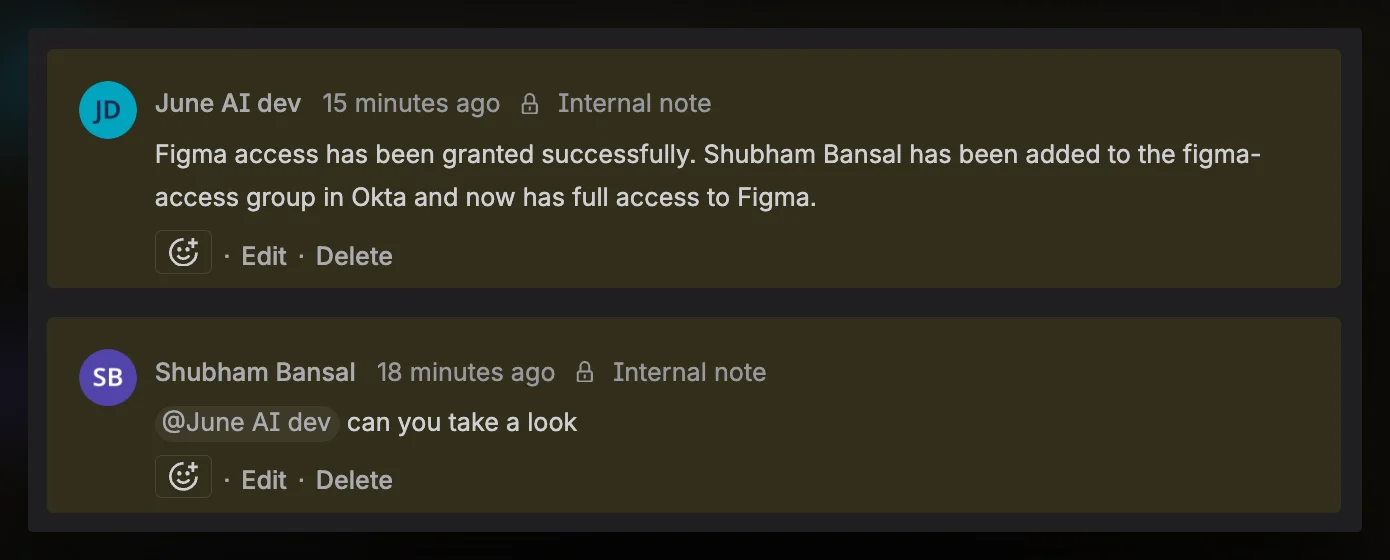
  • Trigger June via mentions or assignments — Tag @June AI in a comment or assign a ticket to have June take action
  • AI-powered triage — June reads tickets, identifies affected devices and users, and classifies priority
  • Asset-aware responses — June includes device specs, warranty status, and health data when responding to tickets
  • Automated actions — Create tickets, update status, add comments, and transition workflows
Jira Integration

Firstbase Integration

We’re excited to launch our Firstbase integration, giving you complete visibility into device procurement and logistics directly within June. Query order status, track returns, and look up inventory—all through natural language.

What you can do from with June AI chat:

  • Track equipment orders — Get order details including status, items, SKU info, and shipment tracking
  • Track returns — View return status, retrieval method, and items being returned
  • Search by employee — Find all orders and returns for a specific person
  • Inventory lookup — Look up equipment by serial number to identify ownership
  • Natural language queries — Ask June “What’s the status of John’s laptop order?” or “Show me pending returns”
Bug Fixes
  • Slack Notification UI: Fixed visual issues in the Slack notification interface.
  • UI Build Security: Removed secrets from the UI build process for improved security.

Okta SSO Integration

We’re excited to launch Okta SSO integration, giving your team seamless, secure access to June using their existing Okta credentials. With OIDC-based authentication, your users get automatic provisioning and centralized identity management.

What you get:

  • Single sign-on — Users authenticate with Okta and are automatically logged into June
  • Automatic user provisioning — New users are created automatically on first login
  • Email-based account linking — Existing June accounts are linked by matching email
  • Centralized identity management — Manage access through Okta assignments and groups
  • Enhanced security — Leverage Okta’s MFA and security policies for June access
Product Improvements
  • Notes for Assets & Employees: Add notes to assets and employees with a new Notes & Docs tab on detail pages for better documentation and context.
  • Display Filters: New display settings for Assets and Employees pages with filtering options for easier data management.
  • Refresh Calculation Overhaul: Completely refactored refresh planning logic and UI for more accurate and helpful device refresh recommendations.
  • Dependency Upgrades: Updated Rails dependencies for improved security and performance.
Bug Fixes
  • Policy Text Spacing: Corrected text spacing issues in the policy display interface.

Document uploading and AI processing

This week introduces document attachments with AI processing, and important data integrity fixes.

Features

  • Document Attachments: Attach documents to assets, employees, and contracts with AI-powered parsing and extraction. Documents now support many-to-many relationships for flexible organization.
Product Improvements
  • Software Activity Tracking: Improved last active date tracking for software subscriptions by prioritizing assigned application events.
Bug Fixes
  • Okta App Lookup: Fixed duplicate software entries of applications with the same name.
  • Okta Event Mapping: Corrected email address matching issues that prevented last_active_at from being set properly.
  • Okta Deleted Apps: Gracefully handle errors when apps are deleted in Okta during sync, preventing sync failures.
  • Security Vulnerabilities: Patched security vulnerabilities in frontend dependencies.

Okta Entitlements & Identity Governance

This week brings enhanced Okta entitlement management for better visibility into application access across your organization.

Features

  • Okta Managed Apps & Entitlements: Track and manage Okta-managed applications, groups, and user entitlements with a redesigned policies table featuring status badges.
Product Improvements
  • Status Update Tool: Enhanced the asset status update tool to support the recycled status option.

Identity Governance & Employee Insights

This week’s release focuses on Okta managed applications, enhanced employee details, and improved rate limiting for identity provider integrations.

Features

  • Okta Managed Applications: Full support for tracking Okta-managed applications, groups, and entitlements within June with new database models and sync capabilities.
  • Employee Details Enhancement: View which groups and applications each employee has access to, with source attribution for better identity governance insights.
Product Improvements
  • Okta Rate Limiter: Implemented cross-process adaptive rate limiting to respect Okta’s conservative API limits.
  • Okta Token Caching: Authentication now caches tokens in the database, preventing unnecessary token refreshes that hit rate limits.
  • UI Tweaks: Fixed toast notifications and added avatar icons to member displays.
Bug Fixes
  • Okta 429 Errors: Fixed rate limit errors when fetching app assignment data from Okta.

Identity Provider Tools

This week introduces identity provider tools for Okta and Google Workspace, enabling group management directly through June.

Features

  • Okta Group Management Tools: Add or remove users from Okta groups directly through June, with full group information retrieval capabilities.
  • Google Workspace Group Tools: Manage Google Workspace groups including adding and removing members from groups and calendars.
Product Improvements
  • Avatar & Slack Sync: Employee avatars now sync from Slack, with chat source icons displayed in the UI.
  • Dependency Updates: Upgraded gems in the API service for improved security and performance.
Bug Fixes
  • JAMF Location Assignment: Corrected device location assignment issues in JAMF integration.

June Bot Actions & UI Updates

This week’s release is all about making June more automated and interactive. We’ve supercharged the June Bot to take action on your behalf and rolled out a general refresh of the application.

Product Improvements
  • June Bot Actions: The June Bot is no longer just for answering questions. It can now be used to perform actions, including:
    • Bulk Device Status Updates: You can now ask the bot to update the status of multiple devices at once. This action is also available in the UI.
    • Update Device Status: Change the status or physical condition of a specific device directly from chat.
  • Improved Bot & Tool UI: We’ve rolled out a new, cleaner UI for approving actions suggested by the June Bot.
  • June Bot Engine Upgrade: Re-architected the June Bot’s backend, making it more powerful and able to support a wider range of tools.
  • General UI Refresh: Shipped a refresh of the main June web application, including various styling updates.
Bug Fixes
  • ITSM Tool Fix: Fixed a bug where parameters for the “Create Ticket” tool were not being processed correctly.
  • Mobile Web UI: Addressed an issue that caused jerky scrolling and visual instability on mobile devices.
  • Navigation & Chat Tweaks: Made several minor adjustments to the main navigation and chat UI for a smoother experience.

Platform Security & June Bot

This week’s updates include foundational work to make the June Bot more powerful, alongside important security fixes and platform upgrades.

Product Improvements
  • June Bot Tool Registry: Implemented a new “Tool Registry” for the June Bot. This foundational work will allow the bot to become more capable and perform a wider range of actions in the future.
  • Show Device Metadata: You can now see custom device metadata fields, previously only stored in the backend, on the device details page.
  • Integration Capabilities: The UI now shows an integration’s capabilities even before it is connected.
  • Security & Performance Upgrades:
    • Upgraded the platform to Rails 8.1 to improve performance and security.
    • Implemented new infrastructure for running regular security scans.
Bug Fixes
  • Integration Disconnect: Improved the workflow for disconnecting an integration to give you more control over what happens to your data.
  • Security Vulnerability: Patched a security vulnerability in one of our frontend libraries.
  • UI Fix: Hid the “copy” button on integration pages when there is no secret to copy.

Device Security & Platform Stability

This week, we’re enhancing device security with the ability to view lock pins. The majority of our work focused on significant performance and stability improvements for backend services, job processing, and MDM sync.

Product Improvements
  • View Device Lock Pin: You can now look up and view the device lock pin for computers directly in the June UI.
  • MDM Sync Performance: Greatly improved the performance and efficiency of the daily MDM sync, reducing database load and speeding up data processing.
  • Improved Background Job Performance: Optimized how background jobs and device actions are queued and processed, leading to a more responsive system.
Bug Fixes
  • Jamf Mobile Device Assignment: Fixed a bug that was preventing correct device assignment for mobile devices in Jamf.
  • Agent Stability: Resolved an issue with the agent’s ability to handle parallel tool calls.
  • ITSM Webhook Permissions: Fixed a data permission (RLS) issue that was affecting the processing of ITSM webhooks.
  • Background Job Prioritization: Corrected a bug to ensure that long-running and quick background jobs are prioritized appropriately.
  • Backend Stability: Fixed a database transaction issue to prevent data rollbacks during certain events.

Unified Software Inventory (Part 2) & ITSM

This week, we’re launching the next major phase of our Unified Software Inventory, allowing you to manage contracts and licenses. We’ve also continued building our ITSM integration framework and improved key workflows.

Product Improvements
  • Software Contract & License Management:
    • You can now create and manage software contracts, including renewal dates and owners.
    • Assign licenses to users directly from the software details page.
    • A new UI to view and manage all software contracts.
  • New Software Details Page: Launched a completely redesigned software details page, which includes new counts for applications, licenses, and contracts.
  • ITSM Webhook Framework: Continued foundational work for our upcoming ITSM integrations by building secure webhook endpoints to receive events.
  • Smarter June Bot: Improved the June Bot’s ability to understand prompts and retrieve software details.
  • Refresh Planning in Sidebar: Added “Refresh Planning” as a primary item in the navigation sidebar for easier access.
  • Cleaner Refresh Planning: Decommissioned assets are no longer included in the refresh planning queue.
  • UI & Performance Updates:
    • Your sorting preferences (e.g., A-Z) on tables are now saved locally.
    • Renamed the “Deleted” device status to “Awaiting Enrollment” for clarity.
    • Deployed routine gem and dependency upgrades for security and performance.
Bug Fixes
  • Stale Asset Detection: Fixed an issue in the logic used to identify stale assets, improving data accuracy.
  • Refresh Planning UI: Corrected a bug on the refresh planning page that affected chart display and data.
  • Integration Loading: Resolved a bug that could prevent active integrations from loading correctly.
  • Device Assignment: Improved how device unassignment actions are handled, especially for devices that are no longer found in your MDM.

Unified Software Inventory & Asset Management

This week’s release introduces a major update to software management, allowing you to track licenses, contracts, and application details all in one place. We’ve also launched a new Asset Dashboard for a better high-level view of your hardware.

Product Improvements
  • Unified Software Inventory:
    • License Assignment: You can now assign software licenses to users for both installed applications and SaaS subscriptions.
    • Contract & Renewal Tracking: Added new fields to track contract value, renewal dates, and contract owners for software applications.
    • Application Reviews: You can now log application security reviews and set next review dates.
    • Software Categories: Implemented a new system for categorizing software, complete with a new UI and backend models.
    • Export Software Data: Added a feature to export your software application data.
  • New Asset Dashboard: Launched a new dashboard to provide a comprehensive overview of your assets.
  • ITSM Integration: Continued foundational work on our upcoming ITSM integrations, including testing ticket creation.
  • Improved Agent Search: Updated the June agent to include additional data for improved search results.
Bug Fixes
  • Connection Stability: Fixed a bug that could cause connection issues with the real-time update service.
  • Data Permissions: Resolved an issue related to data access permissions (RLS).

ITSM Integration

This week’s release lays the foundational work for our upcoming ITSM integrations with platforms like Jira and ServiceNow.

Product Improvements
  • ITSM Integration Framework: Built the core backend systems to support future integrations with ITSM platforms (Jira, Linear, ServiceNow). This includes new authentication flows and database models.
  • Software License Tracking: Implemented new systems to track software licenses and their assignments to users.
  • Improved Asset Importing: Enhanced the asset import process, including the ability to create new user profiles during an import.
  • MDM Integration Details: The UI now displays the last sync time for MDM integrations.
  • Agent Performance: Made several improvements to the June agents’ performance and data handling.
Bug Fixes
  • Personnel Classification: Fixed a bug in the logic that classifies personnel types.
  • Employee Dashboard: Resolved several query issues to improve the accuracy and speed of the employee dashboard.
  • Asset Assignment: Fixed issues related to employee data loading during asset assignment and location assignment during asset syncs.
  • Agent Stability: Addressed a bug that could cause the agent to disconnect unexpectedly.
  • Jamf Integration: Fixed a bug to ensure the correct username is used when creating users in Jamf.
  • UI & Styling: Corrected various UI styling issues, including date formatting and table column display.
  • Data Permissions: Resolved several data permission and access-level (RLS) issues.

Employee Dashboard & Refresh Planning

This week, we’re introducing a new employee dashboard to give you a better overview of your team. We’ve also added more detailed controls for managing the device refresh life-cycle.

Product Improvements
  • New Employee Dashboard: Launched a new dashboard to provide key statistics and a better visual overview of your employees.
  • New ‘Deferred’ Status for Device Refreshes: You can now mark devices as ‘Deferred’ in the refresh planning queue, giving you more granular control over the hardware life-cycle.
  • Import Asset Assignments: Added the ability to import asset assignments, making it easier to bulk-update device ownership.
  • Improved Kandji Integration: The agent can now fetch the last check-in date from Kandji, even if other MDM details aren’t present.
  • Agent & Performance Updates: Updated agents to support new search capabilities and improved asset table performance.
  • General Security & Performance Updates: Deployed routine updates to backend dependencies to ensure the platform remains secure and performant.
Bug Fixes
  • Employee Growth Chart: Fixed an issue where the employee growth trend was including all employees instead of only active ones, leading to inaccurate data.
  • Dashboard Graph Tooltips: Corrected graph calculations and added legend colors to tooltips for better readability.
  • Upcoming Employee Changes: Resolved a bug affecting the “Upcoming employee changes” data.

Device Management and Organizational Visibility

This week we focused on device management and organizational structure improvements. You can now track the physical condition of devices and manage departments and locations directly in June.

Product Improvements
  • Physical Asset Condition Tracking: Implemented a new system to track the physical condition of assets, including whether devices turn on, display status, and other attributes. This helps determine if devices are suitable for redeployment or need to be decommissioned.
  • Location and Department Management: You can now create, update, and delete locations and departments. The new UI provides visibility into which employees and assets belong to each organizational unit.
  • Software Policy Contact Assignment: Added the ability to assign employees as contacts for software policies, helping you designate a primary contact for renewals and contract management.
  • MDM Offboarding: Devices will automatically be removed from your MDM when an employee’s departure is processed in June.
  • Assign Locations to Devices: You can now directly add and assign locations to your devices.
Bug Fixes
  • Windows 11 Device Recognition: Fixed an issue where the agent was not properly identifying Windows 11 devices, resolving incorrect device classification.
  • AI Agent Stability: Addressed a bug that was causing the AI agent to malfunction.
  • Integration Settings: Resolved an error that could occur in the backend when saving certain integration settings.

Asset Management & UI Improvements

This cycle, we focused on improving data accuracy and streamlining common actions for asset management, alongside several UI and performance enhancements.

Product Improvements
  • MDM User Assignment Sync: Assign devices to users in June with automatic synchronization to your MDM.
  • Refresh Planning Queue Actions: You can now approve or ignore devices directly from the refresh planning queue, speeding up your workflow.
  • Hardware Spend Tracking: Added new capabilities to track and report on hardware spending.
  • Dark Mode Support: Implemented new icons and UI improvements for a better Dark Mode experience.
  • Improved Device Assignment: Updated the interface for assigning and unassigning devices, making it clearer and faster.
  • Refresh Due Date for Assets: You can now add a “Refresh Due Date” to assets for better life-cycle planning.
  • Assign Device to Location: Added a new action to easily assign a device to a specific location.
  • Cleaner Asset List Display: Assets without a serial number are now hidden from main views to reduce clutter and improve clarity.
  • Duplicate Asset Cleanup: We’ve cleaned up duplicate assets in the system to improve data accuracy.
  • Improved Okta Integration: Optimized the Okta integration to be more reliable and reduce performance errors.
  • New Status Filtering Options: Added new options for filtering by status.
Bug Fixes
  • Asset Table Loading: Fixed a bug that could cause the asset table to load or filter data incorrectly.
  • Dashboard Subscription Count: Corrected an issue where the dashboard’s subscription count was inaccurately stuck at zero.
  • Automatic App Updates: Fixed an issue that prevented some users from seeing the latest version of the app without a manual refresh.
  • Status Synchronization: Resolved a bug causing data synchronization issues for device statuses.
  • Assignee Synchronization: Addressed a bug related to synchronizing asset assignee information.

Device Management and Organizational Visibility

This week we focused on device management and organizational structure improvements. You can now assign devices to employees with automatic MDM sync, track physical device conditions, and manage departments and locations directly in June.

Product Improvements
  • Device Assignment with MDM Sync: Assign and unassign devices to employees directly in June with automatic synchronization to your MDM system. Assignment automatically updates location and department information, eliminating the need to manage data in multiple places.
  • Physical Asset Condition Tracking: New asset condition monitoring system that tracks whether devices turn on, all ports and keys work, enclosure condition, display status, and other physical attributes. This helps determine if devices are suitable for redeployment or should be recycled/decommissioned, providing better refresh planning beyond just age and warranty data.
  • Department and Location Management: New UI for managing departments and locations with visibility into which employees and assets belong to each organizational unit. This organizational data was previously not visible in the application.
  • Software Policy Contact Assignment: Assign employees and their roles to software policies, allowing you to designate primary contacts for renewals and contract management.
Bug Fixes
  • Windows 11 Device Recognition: Fixed AI agent to properly identify Windows 11 devices by recognizing that OS version 10.0.22000 and above indicates Windows 11, resolving incorrect device classification.

Enhanced Data Visibility and Tracking

This week we focused on improving user experience and fixing bugs across the platform. We’ve added table sorting to asset, software, and employee sections, enhanced data source tracking so you know where your information comes from, and resolved several integration issues that were affecting data quality.

Product Improvements
  • Universal table sorting: All asset tables, software tables, and employee sections now support comprehensive sorting across all columns.
  • Integration source visibility: See which integration last updated each employee and asset record, giving you complete transparency into your data sources.
  • Update history tracking: View a detailed history of data changes with timestamps and source information for better audit trails.
  • Custom property display: Employee detail pages now show all properties pulled from your identity providers, giving you a complete view of employee information.
  • Improved table performance: Fixed layout issues and column width inconsistencies that caused visual jitter when sorting.
  • Enhanced AI prompts: Updated AI agent prompts to better handle employee and cost-related questions with more accurate responses.
Bug Fixes and Reliability Improvements
  • Okta optimization: Okta integration now syncs login events for active users only, significantly improving sync performance and reducing unnecessary API calls.
  • Google Workspace stability: Fixed app name extraction errors that were causing Google integration jobs to fail.
  • Jamf purchase data preservation: Jamf integration no longer overwrites purchase details from Apple Business Manager, ensuring data integrity across integrations.
  • Product pricing accuracy: Fixed catalog price update jobs to properly create purchase details when they don’t exist, ensuring accurate cost tracking.
  • Faster data processing: Optimized backend queries for better performance when loading large datasets.
  • Reduced API overhead: Minimized unnecessary API calls across all integrations to improve sync reliability and speed.

AI-Powered Data Enrichment

We’ve enhanced June with intelligent data enrichment that automatically adds context to your IT inventory. These AI-powered capabilities remove the need for manual research and give you the information you need to make faster, better decisions. From real-time device valuations to plain-English software descriptions, June now delivers the insights you used to look up elsewhere.

Automated Device Valuations

  • Apple devices now include automatic market value estimates based on current conditions and specifications.
  • Get instant insights for budget planning, insurance reporting, and refresh cycle optimization.
  • Eliminate manual price research and ensure accurate financial reporting across your entire Apple fleet.
  • Coupled with data from Apple Business Manager, now plan depreciation and hardware spend across all of your Apple devices.

Intelligent Software Context

  • June AI now generates clear, plain-English descriptions for every discovered application.
  • Helps IT teams quickly understand purpose and functionality without hours of manual research.
  • Surfaces context that makes software reviews, approvals, and renewals faster and more consistent.
Product Improvements
  • Agent run settings: Gain full control over when AI agents run. Choose flexible options like daily, weekdays, or weekends, and set exact execution times so agents operate on your schedule.
  • Software Ownership Tracking: Assign approvers and sponsors to software applications, making it easy to see who owns renewals and budgets.
  • Kandji Firewall Tracking: Firewall status from Kandji-managed devices is now collected and applied against your compliance policies. This means June can fully evaluate firewall requirements for assets managed in Kandji, just like it already does for other MDM systems.
  • Recovery Key Status: You can now see escrow status for each device directly on the compliance tab. This makes it easy to confirm whether recovery keys are properly escrowed in Jamf or Kandji, ensuring devices meet your encryption requirements.
  • Navigation: Software and asset sections have been reorganized so you can find devices, apps, and policies faster.
  • Software policy analyzer updates: When the analyzer updates a policy, June now highlights the exact change and shows the reasoning behind it. This gives you clear visibility into both what was changed and why.
  • Improved integration events. Integration events now have a partial success status when the integration sync finishes with errors but still managed to sync some data.
  • Performance: The employee page now loads 2× faster, making it quicker to view device assignments and employee details.
Bug Fixes
  • Jamf sync no longer makes unnecessary API calls that triggered rate-limit errors.
  • Fixed an issue where ABM data was being overridden with null values causing existing data to be cleared out.
  • Slack integration handles 429 errors correctly; channel selection works with either name or ID
  • Asset compliance fields are now correctly populated for devices that were previously missing some fields.
  • Fixed a bug where mobile device activity was not being fetched from Jamf. The system was always calling the computer history endpoint; it now scopes correctly by device type.

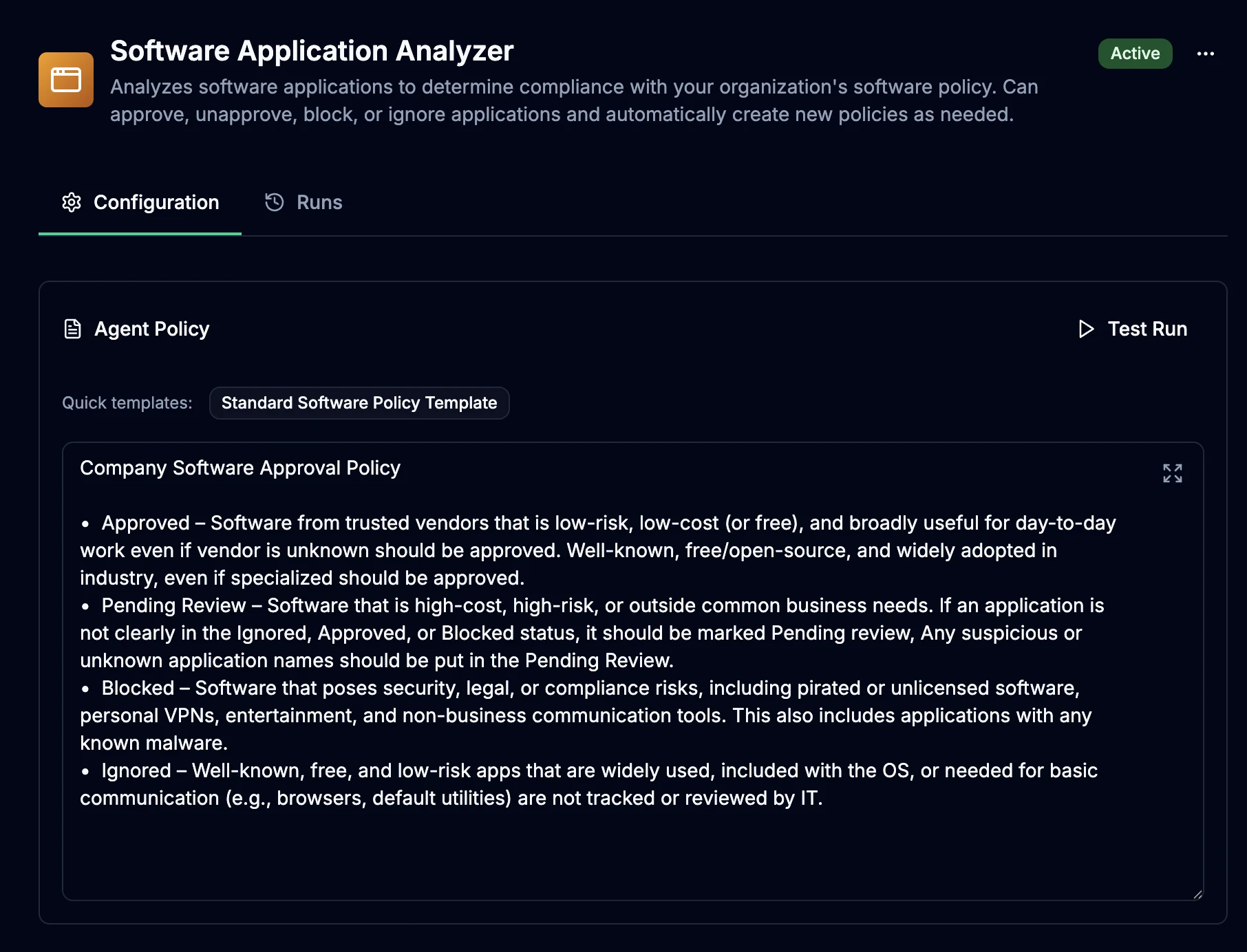
AI-Powered Software Policy Agent

AI Software Policy Agent Dashboard

Introducing the Software Application Analyzer - an AI agent that automatically reviews discovered software against your organization’s policy and suggests whether applications should be approved, blocked, or require manual review. This intelligent system reduces manual IT review workload by up to 80% while ensuring consistent policy enforcement and enhanced security across your entire organization.

Automated Software Compliance

  • AI agent continuously analyzes all discovered software applications
  • Automatically categorizes applications as approved, blocked, or requiring review
  • Learns from your organization’s existing policy decisions and preferences
  • Provides detailed reasoning for each recommendation

Intelligent Policy Enforcement

  • Consistent software approval decisions across your entire organization
  • Reduces manual IT review workload by up to 80%
  • Maintains security and productivity standards automatically
  • Flags potentially risky or non-compliant software immediately

Customizable Policy Configuration

  • Configure AI agent behavior to match your organization’s specific requirements
  • Adjust approval criteria, risk tolerance, and compliance standards
  • Set custom rules for different software categorie
  • Fine-tune the AI’s decision-making process based on your security policies
Product Improvements
  • Integration Reliability & Performance: Updated all integrations for enhanced reliability and performance improvements
  • Integration Event Logging: Improved event logging now available on the integrations page for detailed sync information
  • Software Installations Filtering: Added filters for platform and software policy status on the software installations page
Bug Fixes
  • Fixed Microsoft Entra ID integration to properly pull in RAM data for complete device information
  • Resolved null asset status issue - all assets now default to “Other” status when no status is present
  • Updated asset value calculation logic to properly discard assets with “Other” status from financial calculations
  • Fixed a bug in the assets export to correctly export all asset data

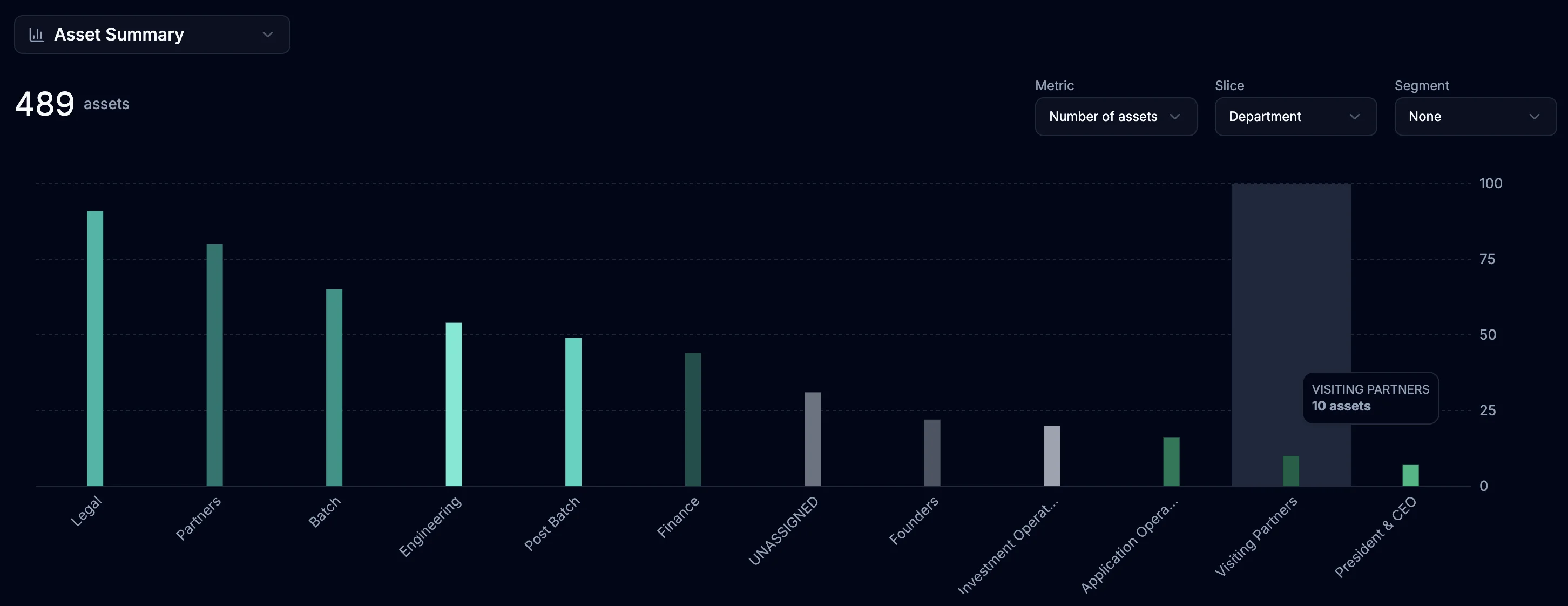
Introducing Asset Insights

Advanced Asset Reporting Dashboard

We’ve launched advanced reporting capabilities to help you get more from your asset data. With powerful tools to slice, segment, and analyze your inventory, you can uncover trends, optimize procurement and lifecycle decisions, and see exactly how costs are distributed for smarter budget planning. Plus, you can generate executive-ready reports with flexible analysis that adapts to your needs. It’s now available for all June users via the Insights tab in the navigation bar.

Comprehensive Metrics

  • Count & Percentages: See asset distribution across categories
  • Financial Analytics: Track total cost, average cost, and book values
  • Age Analysis: Monitor average asset age to inform refresh planning
  • Cost Per Employee: Understand hardware investment by team member

Flexible Data Slicing

  • Primary Dimensions: Group assets by Status, Product, Department, Platform, Asset Age, Warranty Status, and more
  • Secondary Segmentation: Further break down each group by additional dimensions for deeper analysis

Smart Grouping Examples

  • View all laptops by department, segmented by warranty status
  • Analyze mobile devices by platform, segmented by refresh status
  • Track asset costs by location, segmented by age bands
  • Monitor deployment status by product type, segmented by condition
Product Improvements
  • Software Applications & Policies Performance: Massive performance improvement - pages now load 300x faster
  • CSV Export for Employees & Products: Export employee and product data to CSV format for external analysis
Bug Fixes
  • Fixed automatic depreciation recalculation when asset prices are updated to ensure accurate book values
  • Fixed calculation errors in cost-per-employee metrics when employees have multiple assigned assets

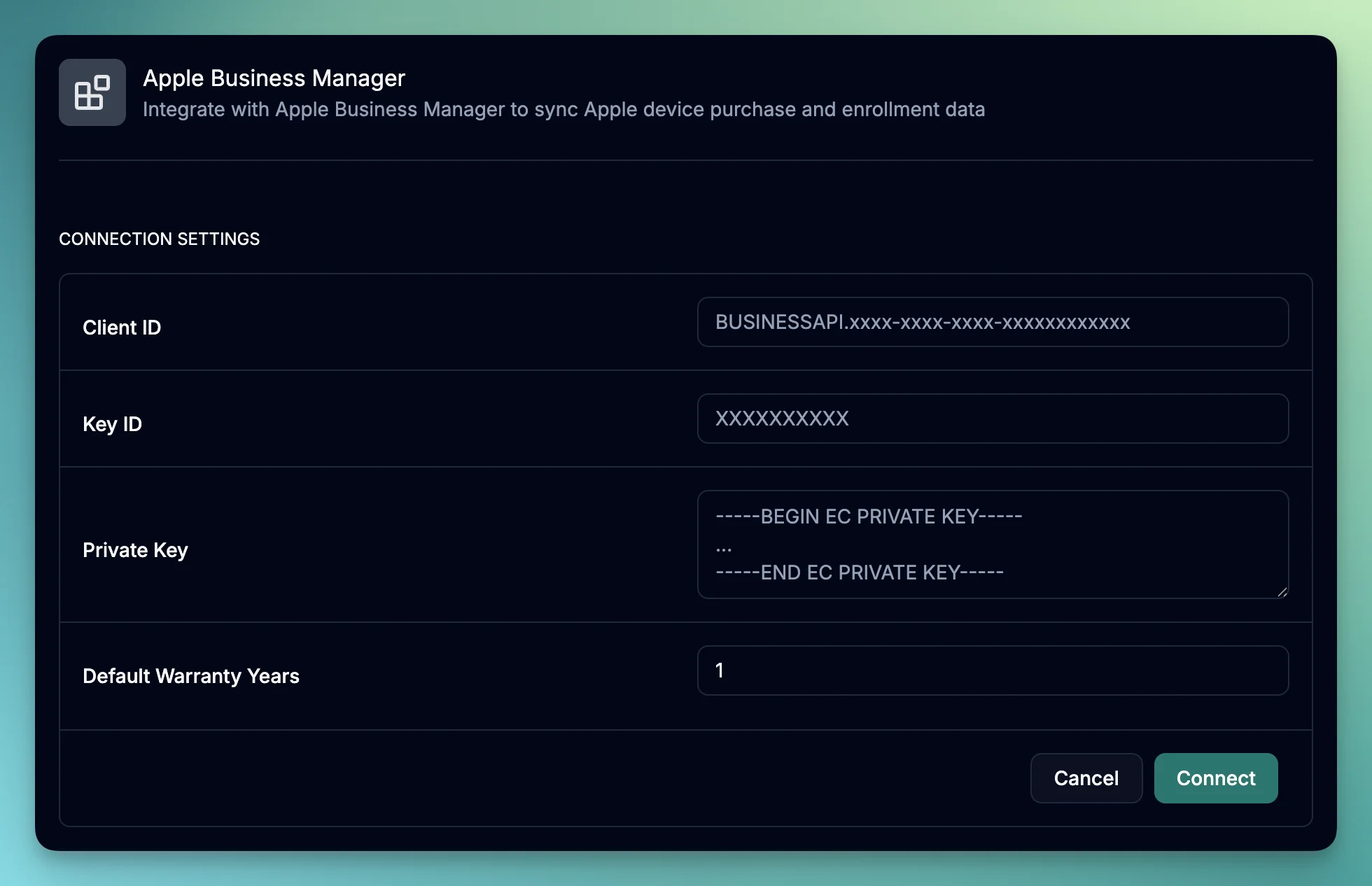
Apple Business Manager (ABM) Integration

Apple Business Manager Integration

We’re excited to announce our new Apple Business Manager (ABM) integration, making it easier than ever to manage your organization’s Apple device inventory within June. Eliminate manual data entry with automatic synchronization that keeps your inventory always up-to-date, get complete visibility of all your Apple devices in one centralized location, and track purchase dates, vendor information, and warranty status for better asset insights.

Key functionality

  • Seamlessly import all your Apple devices from Apple Business Manager
  • Automatically sync device details including serial numbers, models, purchase dates, and warranty information
  • Support for all Apple device types: MacBook Pro, MacBook Air, iMac, iPad, iPhone, and more
  • Track device assignment status and purchase history
  • Monitor warranty periods with configurable default settings
Product Improvements
  • Edit Asset Purchase Data: Edit purchase data directly from an asset including cost, purchase details, and warranty information
  • Product Catalog Status: Products in the catalog now support active and archived statuses to keep your view clean and organized
Bug Fixes
  • Fixed automatic book value regeneration when adding prices to catalog items - all assets belonging to the product now update correctly
  • Resolved product name generation issues during Kandji sync to ensure accurate device identification
  • Fixed Google Workspace integration address sync issue to properly sync employee addresses
  • Corrected Slack integration channel names display in the channel list dropdown

Ready to put IT on autopilot?

Talk to an expert